Your Chat Privately Hosted!

VoceChat is a superlight Rust powered chat app, API and SDK that prioritizes private hosting. Build your own in-app messaging feature with VoceChat!

Google Play IconAPK IconApp Store IconDesktop Download Icon

Open API and SDK for you to host anywhere. No central service.

Bots, video call, publish channel, open ID, open API, open sourced SDK, iterate based on users feedback. Trusted by over 40,000 customers from 50+ countries.

View docsTest APICommunity guides
Feature Icon

Security

  • All data is stored on your own, private, server.
  • The server is developed in Rust with critical business process tests with 80%+ coverage.
  • Read and delete functionality.
Feature Icon

Lightweight

  • The server is less than 20 MB in size and can easily run on a NAS and Raspberry Pi.
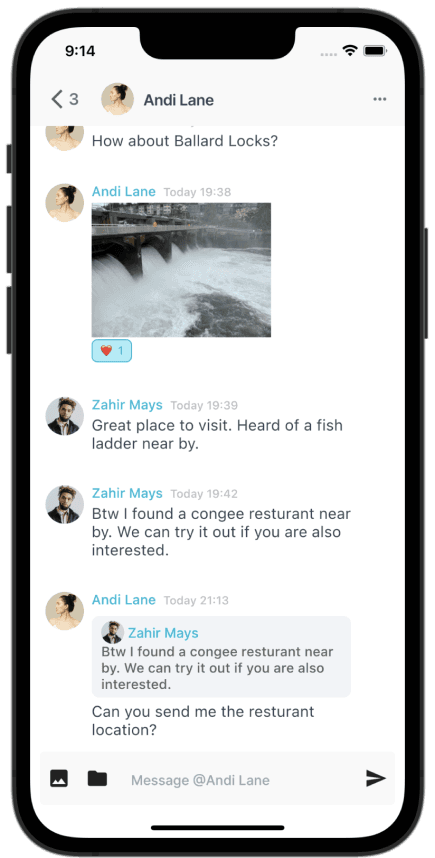
Mobile Demo Picture
Feature Icon

OpenAPI

  • Utilizes open API standard, with easy integration with third-party applications and tools.
  • With complete documentation and testing.
Feature Icon

Cross Platform

  • Developed with Flutter + React.
  • Support Android, iOS, MacOS, Web, and Windows platforms.

Deploy our free-trial version through docker:

For other ways of installation, check out our documentation or community tutorials.

docker run -d --restart=always \ -p 3000:3000 \ --name vocechat-server \ privoce/vocechat-server:latest
After starting the server, visit http://localhost:3000/ to use the app.

Still having a problem?

We would like to have a 25min chat with you to help you out!
Book a MeetingView Doc

Compare our tool with others

ProductsPrivate Hosted Open APIOpen SourceMobile AppLightweight(less than 20 MB)
VoceChatcheck iconcheck iconcheck iconcheck icon
Matrixcheck iconcheck iconcheck icon-
XMPPcheck iconcheck iconcheck icon-
Rocketchatcheck iconcheck iconcheck icon-
Mattermostcheck iconcheck iconcheck icon-
Signal-check iconcheck icon-
Telegram-check iconcheck icon-
Discord--check icon-
Whatsapp--check icon-
Line--check icon-
Slack--check icon-
Wechat--check icon-
MSN----

FAQ

Self-hosted chat, bots, AI agents, webhooks, and video — based on doc.voce.chat and the VoceChat community.

  • What is VoceChat?
    VoceChat is a lightweight, self-hosted chat server built in Rust (about 20 MB). It offers DM and group chat, replies, @mentions, file sharing, burn-after-reading, an open API and SDK, bots with webhooks, and an embeddable website widget — all on infrastructure you control. The server is open source and designed for private cloud, NAS, homelab, and local-first deployment.
  • How do I install VoceChat?
    The fastest way is Docker — one command starts the official image:

    docker run -d --restart=always
    -p 3000:3000
    --name vocechat-server
    privoce/vocechat-server:latest


    Binary and source installs are also supported. See the install guides for TLS, reverse proxy, and upgrade steps.
  • Where can I host VoceChat?
    Anywhere you control. The simplest start is on your own computer — laptop or desktop — and VoceChat includes a built-in Cloudflare Tunnel that gives you a public link to your server, so you can chat from anywhere on the internet without opening router ports or buying a VPS. You can also host on a cloud VPS, a Synology or UGREEN NAS, or keep it on a private intranet for internal teams only. Pick local + tunnel for personal use, VPS or NAS for always-on communities, or intranet when you want zero public exposure. See the install guides for each option.
  • What are the system requirements?
    The VoceChat server itself is about 20 MB and runs on Linux, Windows, macOS, and ARM devices including Raspberry Pi. A VPS with 512 MB RAM or more is plenty for small teams. The official Docker image is roughly 24 MB. Clients are available for iOS, Android, desktop, and web.
  • Is VoceChat free?
    Yes — the self-hosted community edition is free for servers with up to 20 members. Larger communities need a license. Pro unlocks unlimited members, more bots and webhooks, the website chat widget, and email notifications. There is no backdoor and no usage telemetry; license checks use local RSA verification.
  • How do Bots and Webhooks work?
    Server admins create a Bot under Settings → Bot & Webhook, then generate an API Key. Use the key in the x-api-key header to send text, Markdown, or file messages to users and channels via the Bot API. Set a webhook URL on the same bot to receive inbound events — new messages, replies, edits, deletions, and new-user signups (for welcome messages). Webhooks can optionally use AES encryption. This is how teams build live-chat widgets, form-to-chat dashboards, newsletters, and automation backends. See the Bot & Webhook guide and API docs.
  • Can I connect VoceChat to AI agents and OpenClaw?
    Yes. VoceChat is built to be a chat frontend for agents. For a custom AI bot, point a bot webhook at your backend (OpenAI, local LLM, or any service) and reply through the Bot API — see the GPT bot example. For OpenClaw, use the official VoceChat plugin: OpenClaw listens on port 8010, receives VoceChat webhook POSTs, routes them to your agent runtime, and sends replies back via the Bot API — supporting private chat, groups, text, replies, and file uploads. Popular setups include personal AI assistants, local LLM APIs + VoceChat, and OpenClaw-powered bots on your own machine. Read the OpenClaw integration guide.
  • Does VoceChat support video and voice calls?
    Yes, in two ways. VoceSpace lets you self-host branded video and audio conferencing under your own domain with enterprise-grade control — ideal for client-facing chat + video solutions. For the self-hosted server, you can also enable Agora WebRTC in Settings: Agora offers a generous free tier (about 167 hours/month shared across all callers on your server). Start a call from the icon in any chat window.
  • What can I build with VoceChat beyond team chat?
    Community and GitHub use cases include: website live-chat and contact widgets, webhook dashboards for static-site form submissions, internal company messaging, public event boards on landing pages, NAS bookmark and file sharing, private social feeds, customer-support bots, bridges toward Discord or Slack, and in-app messaging via the open API and SDK. Embed the chat widget on any site with a few lines of JavaScript.
  • How secure is VoceChat?
    VoceChat has no backdoor and collects no chat data on Privoce servers — everything stays on your instance. Traffic can use encrypted transmission; messages support burn-after-reading. Webhook payloads can be AES-encrypted. Being self-hosted means you own storage, access control, and retention policies.
  • Where can I get help?
    Start with doc.voce.chat (install, bots, API, OpenClaw, widget). Browse our curated community guides, search or file issues on GitHub (vocechat-server, vocechat-web), email han@privoce.com, or visit the support page for hosting and customization help.

See tutorials, reviews, and deployment guides from across the web.

Browse community picks

From the Web

Articles, videos, and docs about VoceChat — quoted and linked from across the internet.

Host Your Own Chat Server with VoceChat and Docker
FeaturedVideoSeptember 21, 2023

Host Your Own Chat Server with VoceChat and Docker

DB Tech's 17-minute tutorial on self-hosting VoceChat with Docker — deploy, configure, and run a chat server under 20 MB.

Source: DB Tech

featureddockertutorialvideo
View quote
Official Docker Image: privoce/vocechat-server
DocsJune 1, 2026

Official Docker Image: privoce/vocechat-server

The official Docker Hub listing — 100K+ pulls, ~24 MB image, one-command deploy.

Source: Docker Hub

dockerofficial
View quote
Official Docs: Run VoceChat in Docker
DocsJune 1, 2026

Official Docs: Run VoceChat in Docker

Official installation guide — quick start, built-in TLS via CertBot, backup, and upgrade commands.

Source: VoceChat Docs

docsdockertls
View quote
LinkedIn: VoceChat Reaches Nearly One Million Servers
ArticleFebruary 15, 2026

LinkedIn: VoceChat Reaches Nearly One Million Servers

Privoce founder Han Su on VoceChat's growth from 1,000 to nearly one million servers — and how Cloudflare Tunnel lets you host locally and access from anywhere.

Source: Han Su, Privoce

linkedinmilestonescloudflareself-hosting
View quote
How to Deploy VoceChat on UGREEN NAS (Official Tutorial)
VideoNovember 7, 2025

How to Deploy VoceChat on UGREEN NAS (Official Tutorial)

UGREEN's official NASync tutorial series — step-by-step VoceChat deployment on UGREEN NAS via Docker.

Source: UGREEN NASync Official

ugreennasdockervideotutorial
View quote
How to Install VoceChat on Your Synology NAS
ArticleAugust 27, 2025

How to Install VoceChat on Your Synology NAS

Marius Hosting's step-by-step Synology guide using Docker, Portainer, reverse proxy, and WebSocket headers — updated for VoceChat v0.3.0.

Source: Marius Hosting

synologynasdockerportainer
View quote
View all picks

Free

Run VoceChat on your server

$0/forever
Get Started

Key Features

  • ヘLimited Bot and Webhook
  • ヘPublic and Private Channel
  • ヘLimited to 20 members

Pro

Build a community of your own with VoceChat

$49/server
Get Started

Key Features

  • ヘChat widget for customer service
  • ヘUnlimited Members and Bot
  • ヘNo recurring charges
  • ヘNew message email notification

Need help?

Contact us for tech support, e.g. hosting, customization, AI agent development.

$139 to start
  • Email
  • WeChat
  • Zoom

Key Features

  • ヘSource code with license
  • ヘNo recurring charges
  • ヘOn-demand customization
  • ヘVideo and Audio

Want to add chat features to your app?
Book a meeting with our CEO

Be the first to know about releases and industry news and insights.

© 2026 Privoce Inc. All rights reserved.
Privacy PolicySupportBlogDocumentationGitHub
/
  • Twitter
  • GitHub